
How Much TeraBox Storage Do You Actually Need? A Real Breakdown by File Type and Usage
TeraBox 1TB free plan sounds huge on paper, but what does it really hold? Here’s an honest, file by file breakdown of photos, documents, music, and video plus a simple way to estimate exactly how long your own storage will last.

Every TeraBox review says the thing: “1TB free storage!”.. Then moves on. Nobody actually explains what 1TB means once you start filling 1TB. How many photos is a terabyte really? How fast does a video habit chew through 1TB?. Why do two people, with the exact same plan end up with completely different experiences. One never worrying about space the other hitting the limit within months?
This guide answers those questions with numbers, real scenarios and a simple framework you can use to figure out whether TeraBoxs free tier actually fits the way you use your phone, your camera or your work files.
What Does 1TB of TeraBox Storage Actually Hold?
A number for storage is not useful unless you turn it into things you really keep. Let us do that one category at a time using file sizes instead of the best or worst extremes.
Photos
A normal smartphone photo. Taken at 12 to 48 megapixels with compression. Usually weighs between 3MB and 8MB. If we use an average of 5MB per photo:
1TB divided by 5MB is approximately 204,800 photos
That is not a mistake. Even a person taking 50 photos each day every day would not fill 1TB with photos for more than ten years. In reality photos are rarely the reason anyone runs out of space on TeraBox.
Documents
PDFs, Word files, spreadsheets, scanned IDs. These take up little space. A typical multi‑page document is between 0.5MB and 3MB so if we use an average of 2MB:
1TB divided by 2MB is 512,000 documents
Unless you are digitising an entire filing cabinet this is not a limit. Most people who use TeraBox for paperwork will need more space for the TeraBox app far before they need more storage.
Music
A normal‑quality MP3 usually weighs 4MB to 5MB per track. If we use 4.5MB:
1TB divided by 4.5MB is 227,000 songs
That is more than 15,000 hours of music. More than most people will listen to during their whole life let alone keep all, at once in cloud storage.
Video: Where the Math Actually Changes
Here’s the part most “1TB free storage” articles skip entirely and it’s the one that actually matters.
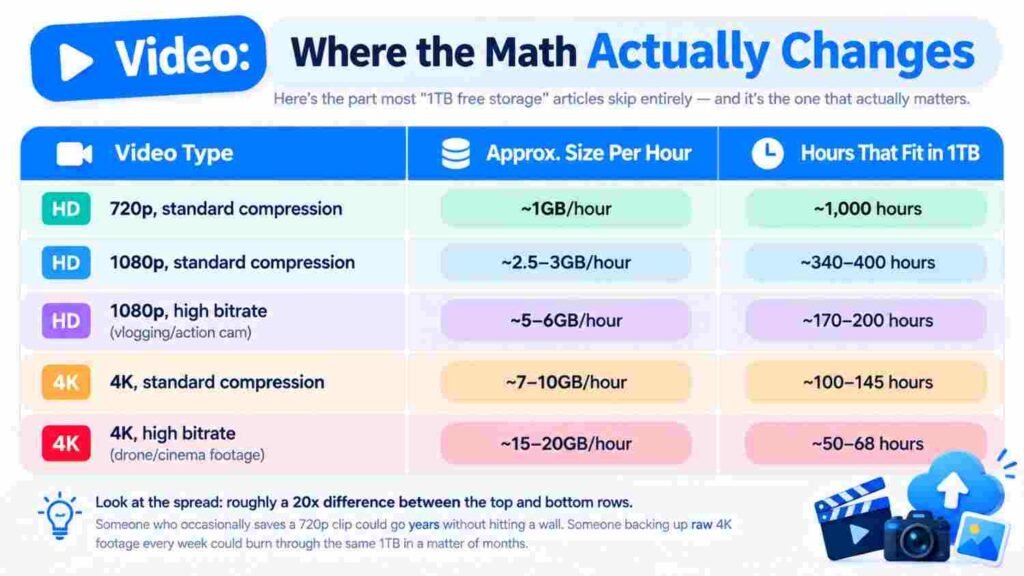
This is the reason behind all those complaints online, about TeraBox storage filling up too fast. It’s not photos. It’s not documents. It’s always the videos. The big high-resolution high-bitrate ones. The numbers don’t lie.
Look at the range here. There’s a 20 times difference between the smallest file size and the largest. Someone who only saves a 720p clips now and then might not even notice they’re using their 1TB space.. Someone backing up raw 4K video every week? That 1TB can disappear in a few months.
1TB Three Completely Different Outcomes
Numbers only make sense once you tie them to real life. Here’s how three different people using the same free TeraBox plan might experience it.
The Student
This person uploads lecture notes, scanned assignments and a hundred photos from campus life each semester. They also share a few video clips for class projects. A typical month includes:
~150 documents or scans (~300MB)
~400 photos (~2GB)
2 to 3 videos for coursework (~1 to 2GB)
Monthly total: around 4 to 5GB. Over an academic year that adds up to less than 50GB. A student could finish a four-year degree. Still have plenty of room left. For someone like this the 1TB limit is not a concern. The free plan feels almost unlimited in practice.
The Freelancer
This user uploads client files, contracts, invoices and some screen recordings for tutorials or client feedback. Their monthly usage includes:
~50 contracts or documents (~150MB)
Design files and project folders (~5 to 10GB depending on how many clientsre active)
A few 1080p screen recordings, each 20 to 30 minutes long (~2 to 3GB)
Monthly total: 8 to 13GB. At this rate the 1TB storage lasts six to ten years. The only thing worth doing is a cleanup. Once a project is done the files should be moved to storage instead of staying in the main account forever.
The Content Creator
This is where the free plan really gets tested. A person who shoots 4K vlogs, B-roll and raw footage might upload:
5 to 10 hours of 4K footage every week (~50 to 100GB)
Edited exports in 1080p or 4K for backup (~5 to 10GB)
Weekly total: around 55 to 110GB. At this rate the 1TB storage runs out in two to four months. The situation gets worse if they use a high-bitrate camera or drone. For this kind of user the free version of TeraBox is not a long-term fix. A smart storage strategy is necessary: old raw footage to an external drive after editing keep only the final versions in the cloud and use TeraBox as a working space not a permanent home, for every video ever shot.
A Quick Way to Estimate Your Storage Needs
Instead of guessing run your own numbers with this four-step method:
Identify the dominant file type. For people the dominant file type is either photos or video occasionally documents if handling heavy paperwork.
Estimate the volume in the dominant file type category. How photos or how many hours of footage do you realistically produce in a normal week?
Apply the size-per-unit figures above. Five megabytes per photo or the video table for footage.
Multiply the result by fifty-two to obtain a total then compare that yearly total against one terabyte (1,024,000MB).
If the yearly total lands under two hundred to three hundred gigabytes the free plan will last you years without a second thought. If the yearly total creeps past five hundred gigabytes to one terabyte annually you are certainly dealing with a video-heavy workflow and it is worth building an archiving habit now rather than getting caught off guard by a failed upload, in the middle of a project.
Final Thought
The question is whether TeraBox storage is truly sufficient. For the majority of users the answer is yes. The answer depends on what you actually store.
If you are a student, an user or a person who mainly keeps documents, photos and occasional videos you are unlikely to reach the TeraBox storage limit at any time soon.
A bigger concern appears for those who regularly create and back up amounts of high‑resolution video.
Heavy video users do not necessarily require a TeraBox storage plan. A smarter workflow can make a bigger difference:
– Keep active projects and final exports in TeraBox storage.
– Move completed raw footage to an external physical drive.
– Remove duplicates and unwanted files every few months.
– Check video sizes and quality settings before uploading large batches.
In words managing TeraBox storage matters more, than simply adding more storage. If you are a content creator or regularly work with 4K footage calculating your expected TeraBox storage usage before you run out can save you from failed uploads and unnecessary upgrades.